Ad Code

Showing posts with label User Creation. Show all posts

Sunday, July 16, 2017

OSGi Configuration : AccountManagementService API in AEM


Hello Everyone,
In our previous blogs, we are already done with user creation and reset password.
You must be thinking then what is left now?
So yes. i am here with some more technical details of AccountManagemntService API in AEM.
In the Felix console,there are three configurations related to “cq.account” in AEM.
Component com.adobe.cq.account.api.AccountManagementService
config1.PNG

Fig - com.adobe.cq.account.api.AccountManagementService


Detailed explanation:

  • Validity period of the manager token: The value of this property shows that the token for reset password or account-confirmation mail has validity of 600 seconds.You can change the value of it as per the requirement.
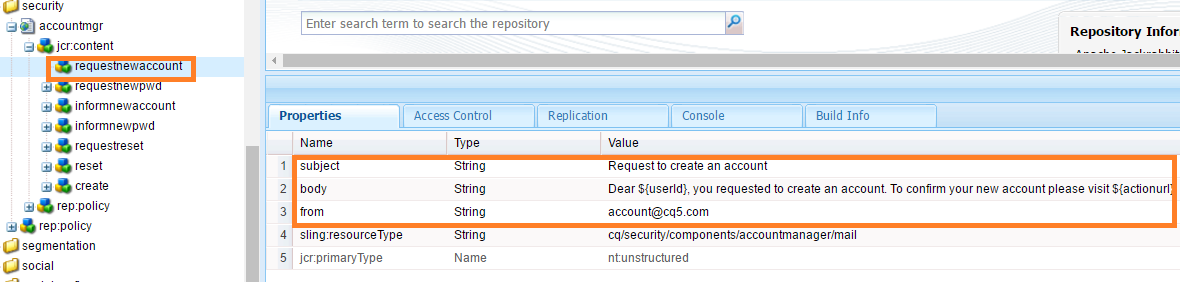
  • Node Name : The “requestnewaccount” is a node in crx having the values of email format to request for a new account .So if there is any customization in email format,you can create a new node and change its properties value.
requestNewAccount.PNG

Fig - requestnewaccount node in crx


  • Node Name: The “requestnewpwd” is having all the values in the email format for request for a new password mail.

requestNewPassword.PNG

Fig - requestnewpwd node in crx


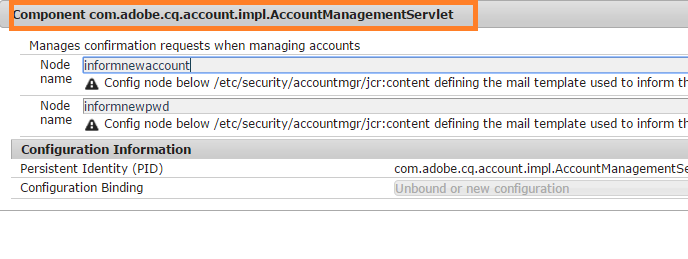
Component com.adobe.cq.account.impl.AccountManagementServlet
config2.PNG

Fig - com.adobe.cq.account.impl.AccountManagementServlet


Detailed explanation:

  • Node Name: The “informnewaccount” is having all the values in the email format to confirm the user about creation of the account.
  • Node Name: The “informnewpwd” is having all the values in the email format to confirm the user about changing the password successfully.

Points to remember:

  • All the nodes specified above are under a specific path “/etc/security/accountmgr/jcr:content”. If any of the node name or  properties need to be changed,  all modifications need to be done under this path only, ,because this path is hard-coded in “AccountManagementServiceAPI in AEM.
  • The  sling:resourceType (cq/security/components/accountmanager/mail) should remain same for the new node.
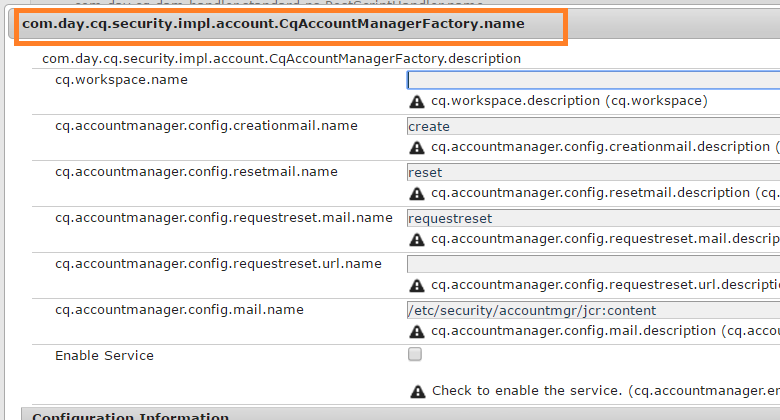
com.day.cq.security.impl.account.CqAccountManagerFactory.name
config3.PNG

Fig - com.day.cq.security.impl.account.CqAccountManagerFactory.name

This configuration was in use when AccountManager API used to work.But in AEM 6.2 ,it has been deprecated. So this configuration is no longer in use from AEM 6.2 onward.

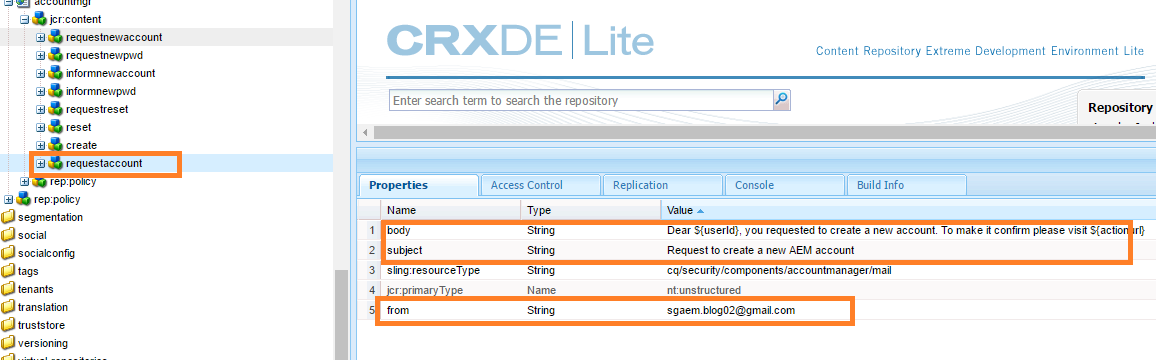
Example: Let’s take an example of changing the format of request for a new account Mail. So i am creating a new node named “requestaccount” and update this name in configuration Manager of Felix console.
new node.PNG
Fig - requestaccount node in crx
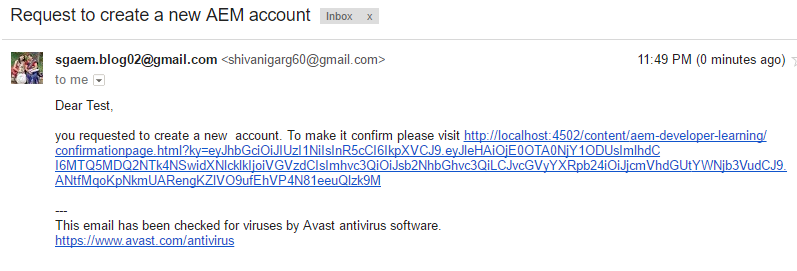
When i register a new user, a mail is sent with a new format.
new mail.PNG
Fig - new mail format
So how it is done!!
Things to remember while using AccountManagementService API in AEM

  • The requestAccount() method has two steps internally
    1. Create a user in AEM in disabled mode.
    2. Send an email to the user for account confirmation.
This method returns true only when these two steps are successfully performed.Sometimes there is a problem in sending mail and it returns false.
  • In the same way resetPassword() method also internally execute two steps:
    1. Reset Password in the AEM instance.
    2. Send a confirmation mail to the user.
This method returns true only if these two steps are executed successfully.

Note: It is important to note that the correct email Configurations are important to deal with this API.
Here is the git repo:

Note:Don’t forget to remove “POST” from filter methods from “Adobe Granite CSRF filter” as we are making a lot of POST requests in this project so need to allow these.

If you have any query or suggestion then kindly comment or mail us at sgaem.blog02@gmail.com

Hope it will help you guys !!
Thanks and Happy Learning .

Monday, March 27, 2017

User Creation using AccountManagementService API in AEM 6.2 - Part1


When it comes to the right access to right person, creating users is the first thing which hit our mind.
Let us see how to create users in AEM6.2.
Initially users were getting created using AccountManager API and but now this is deprecated in AEM6.2
After doing POC I came to know that “AccountManagement Service API” is extended with lot of new features.
Activation of AccountManagementService in Felix Console  
Before using any OSGi Service, ideally it should be in "active" state but AccountManagement Service was in "unsatisfied" state when i checked it.
config.PNG
Fig- Account Management Service in Unsatisfied State

Follow the below Steps to make this Service in active State:
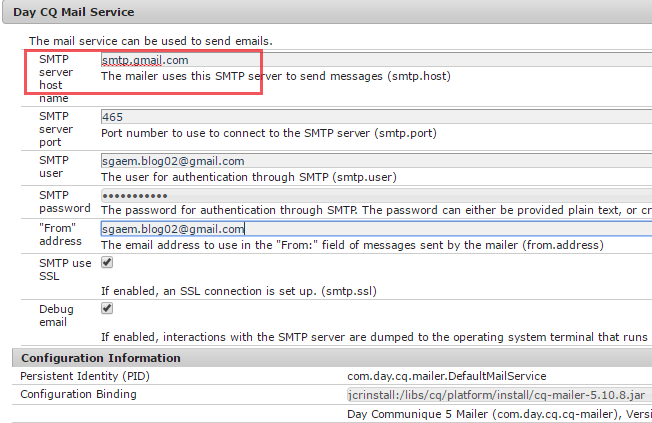
mail.PNG
Fig- Configure Day CQ Mail Service
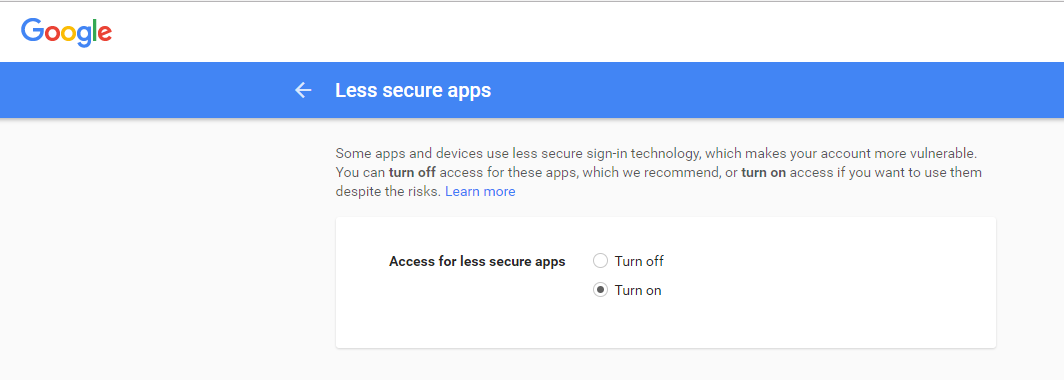
  • The email id which is configured in "Day CQ Mail Service", should turn on the "less secure apps" of google account.
  • To turn it on Click here.
turn on.PNG
Fig- Turn On Less Secure Apps of gmail account
  • Now AccountManagemntService is in "satisfied" and "active" state.
satisfy.PNG
Fig- Account Management Service is in Satisified state


Explanation of AccountManagementService  API

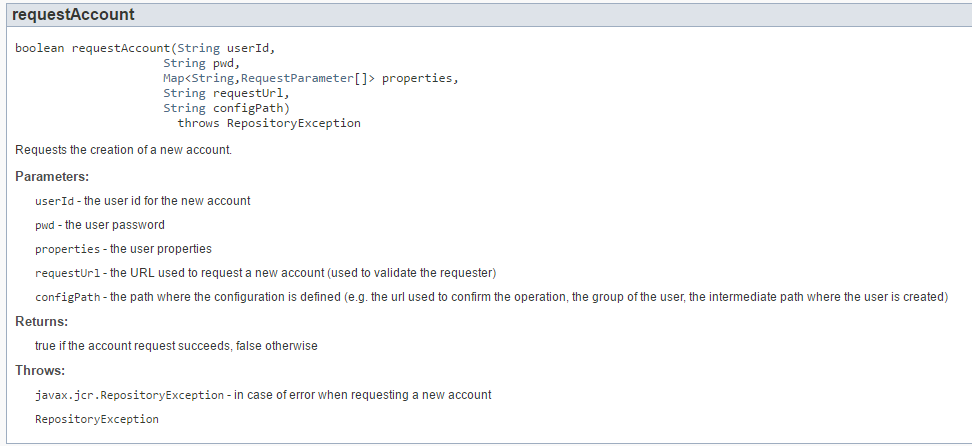
AccountManagementService API provide the below method to create AEM User.
method.PNG
Fig- requestAccount() method of AccountManagementService API

Below are the parameters of requestAccount() method in detail:
  • UserId: UserId  is a name through which, the account will be created in AEM.
  • Pwd: This is the password of the user account.
  • Map<String,RequestParameter[]> properties : In this map, user's profile related all additional values can get stored. In this map “email” property must exist, because email is used for sending the mail to user to confirm or validate a newly created account
user profile.PNG
Fig- Storing properties 
  • requestUrl: API will get the host and port using this parameter which will help to create confirmation page URL. This URL will be sent to user via mail for verifying the account. Example: http://localhost:4502

Note: I have given the example of localhost, but this will not work in other environment i.e QA/UAT. For these environments, domains will be dynamically fetched from “DAY CQ Link Externalizer” configuration from Felix console

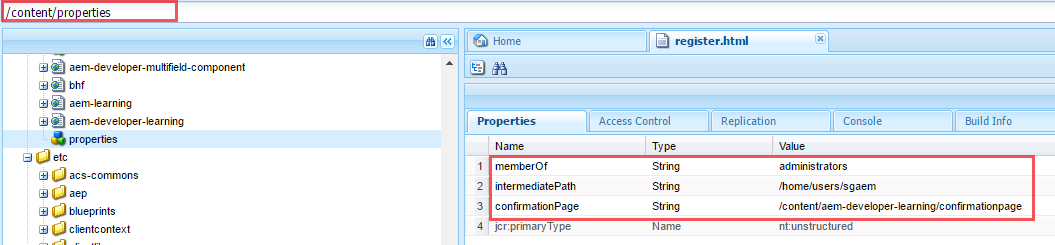
    • configPath: It is a path of the node(e.g., “/content/properties”) type of nt:unstructured , where below three properties need to be added:
    a) memberOf
    b) intermediatePath
      c) confirmationPage
    configPath.PNG
    Fig- config path node with its properties
    Detailed explanation of above Properties:
    • memberOf : This property identifies that the user should be part of which group. If you don’t provide any value to memberOf property,the user become part of “everyone” group. Note: This is an optional field.
    • intermediatePath: By default , AEM users gets created under /home/users.Intermediate path is used to provide customized path for creation of users. Eg: sgaem. So here, all the users will be created under /home/users/sgaem. Note: This is an optional field.
    • confirmationPage: ConfirmationPage link will be sent to email id which is added by user in registeration details. Note: This field is mandatory.


    Functionality of requestAccount() method
    AccountCreation (1).jpg
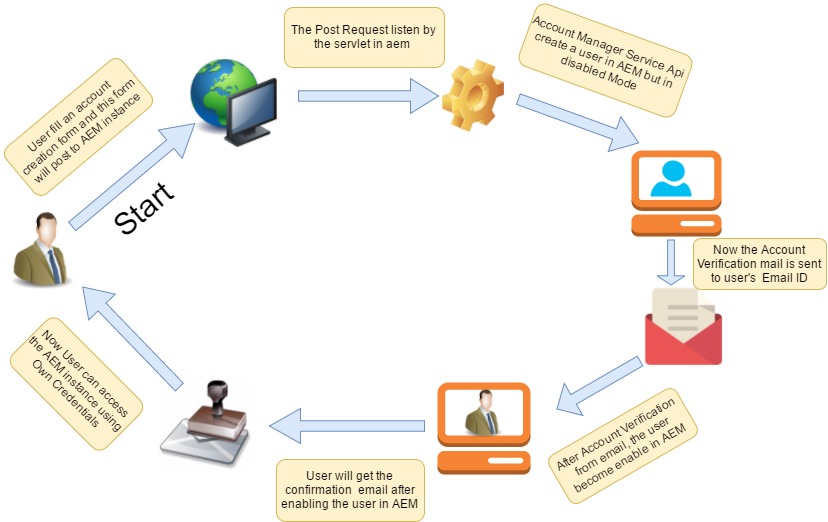
    Fig- Flow of user creation using AccountManagementService API

    Follow the below Steps:
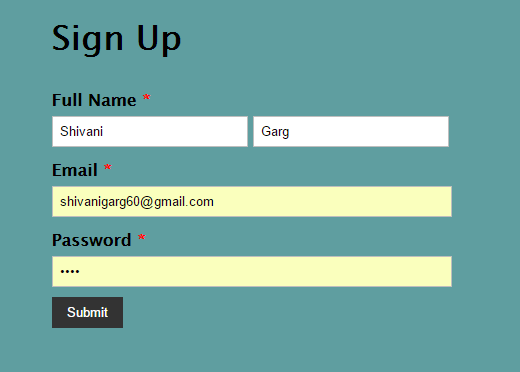
    • User fills the Account Creation form and submits it.
    signUp form.PNG

    • This Request received by the servlet  and the servlet calls the requestAccount() method of AccountManagementService API.

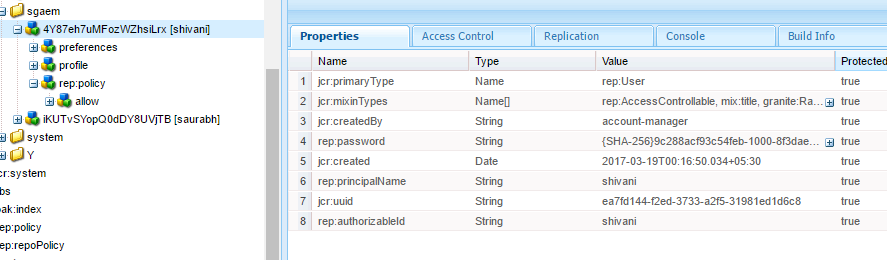
    • This method creates the user in AEM in disabled state and send a verification email to the user.
    userdisabled.PNG
    Fig- Highlighted property shows that the user is in disable state

    mail message.PNG
    Fig- User gets the Account Verification Email 

    • The confirmation link page will be having a component named "emailConfirmation". The emailConfirmation.html contains.

    • User will click on verification link to enable the account in AEM.
    enable-User.PNG
    Fig- User become Enable After Verifying the link
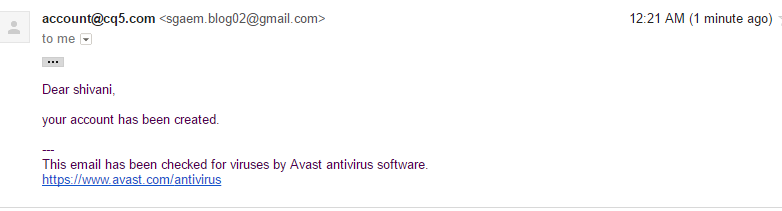
    • Confirmation mail will be sent to user after verification.
    user-creation mail.PNG
    Fig- User gets email for Account Creation
    • Mission Accomplished: and created user can access the AEM instance with his own credentials
    But wait, below issue can screw all the happiness.


    Issue in using AccountManagementService API
    Issue :  Initially I used configPath as “/etc/properties” but accountManagementService.requestAccount() will throw nullPointerException.
    Solution: While checking the code,I came to know that AccountManagementService  API internally using below method to get the Session object.
    private Session getServiceSession()
      throws RepositoryException
     {
       return this.repository.loginService("account-management-service",null);
     }
    "account-management-service “ is a subService defined in User Mapper Configuration.
    user-mapper.PNG
    Fig- Service User Mapper Service Configuration
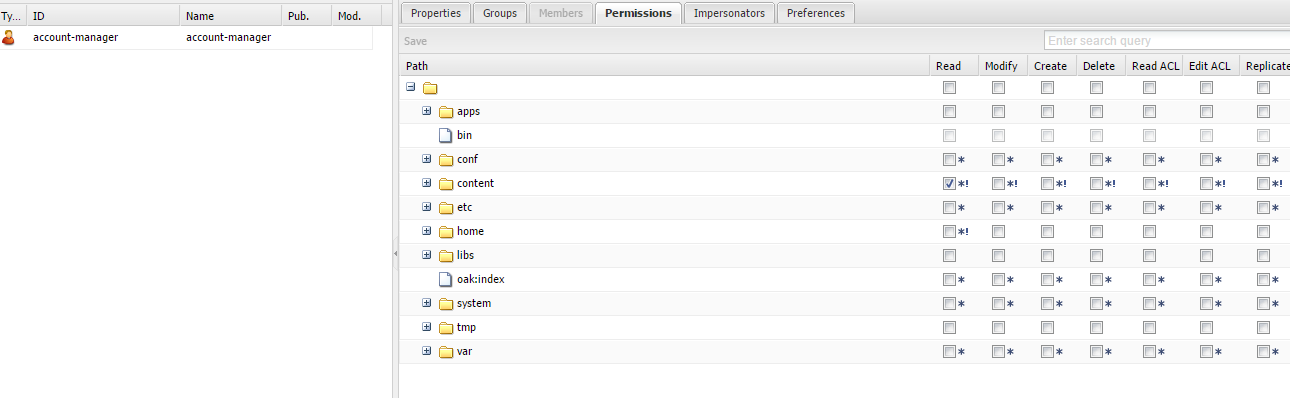
    account manager.PNG
    Fig- Check the Permission of Service user
    "account manager" is a user correspond to "account-management-service" in "Apache Sling Service User Mapper Service Amendment" configuration, but account manager has only permissions for " /content".
    Note: The configPath should be under "/content" or you can give any hierarchy but “account-manager” user must have the permission of that particular configPath.

    Kindly share your feedback and contact us at sgaem.blog02@gmail.com for any query.

    Thanks and Happy Learning 😊