Ad Code

Showing posts with label all about aem. Show all posts

Wednesday, October 23, 2019

Component and Template level design dialogs in Template Editors in AEM

Hello Everyone,

Template Editors is a feature in AEM, which everybody is using right now.
Clients also find it quite exciting, when creation of templates are in their hands.
But Template Editors create few myths in developers minds and I have seen people to
write code based on the basis of myths so I thought of clearing the doubts and wrote about it.

Design Dialog is one of the features which we are using since long and to fetch the value
of design dialog, we always use ${currentStyle.propertyName}.

The concept of design dialog is if you want to share the values of a component across
all the pages created from a single template, we create design dialogs.

Myth:
I have seen people saying that currentStyle doesn't work with dynamic templates so they
always use the PolicyManager whether they really need it or not.Their idea is because previously design_dialog values gets stored in /etc/design/default.. ,currentStyle is only meant for that but because the design dialog value is now inside” /conf/projectName/policies/…” so to fetch the value from policies we need to use PolicyManager API like shown below.
ContentPolicyManager policyManager = resourceResolver.adaptTo(ContentPolicyManager.class);
        if (policyManager != null) {
            ContentPolicy contentPolicy = policyManager.getPolicy(resource);
            if (contentPolicy != null) {
                title= (String) contentPolicy.getProperties().get("title");
            }
        }

But this is not correct. currentStyle can also handle design_dialog values stored inside the
policies.
But i just kept on thinking if ${currentstyle.propertyName} works fine for design dialogs then why so much big logic to do the same thing.

So the answer is in template editors, we have two kinds of design dialogs. 
Component Level: Like any older version of AEM, we can create design dialogs in the components and fetch the value using currentStyle.I already talk about it here.
Template Level: Now you can manage the page level design dialog value also and to fetch that value you need to use the PolicyManager API. You just need to pass “currentPage.getContentResource” as resource and you are able to fetch the value.

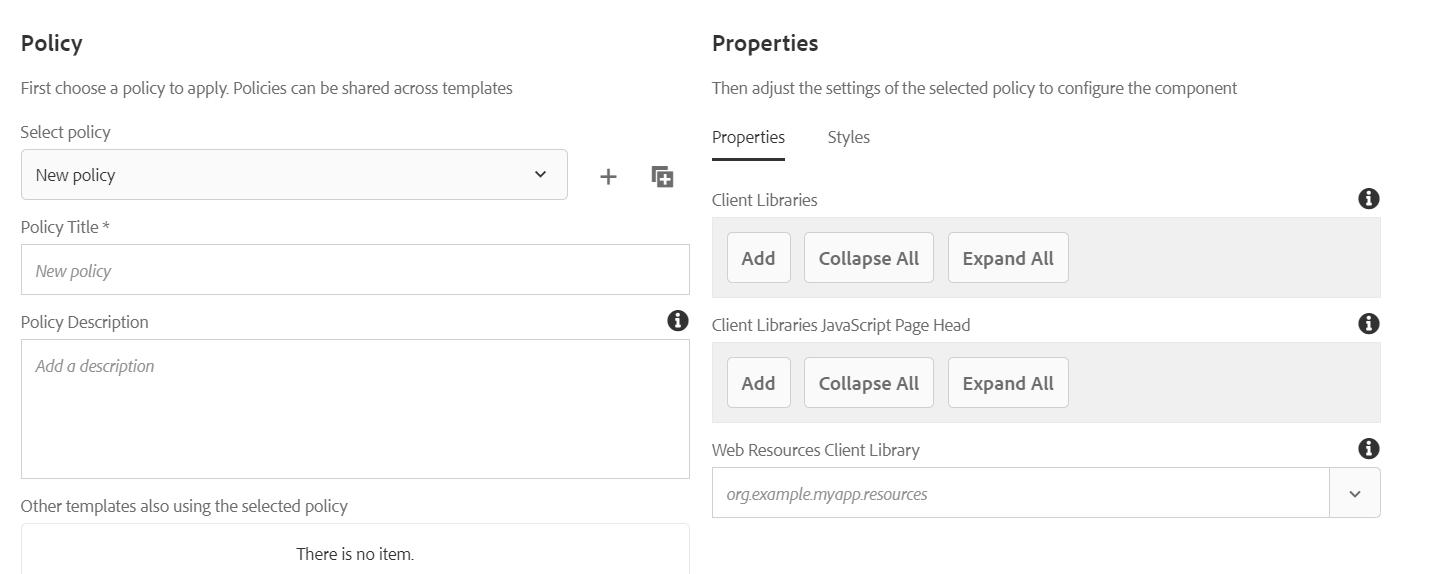
You can see the template level design values(Page Policy) from here:
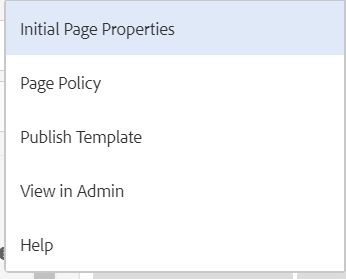
Fig 1: Page Policy in a Template

Fig 2: Design Dialog for a Template
If you want to add a template policy then you add fields in design_dialog of page component and you will able to see the options here.
Because the above logic works well for both "Component and Template Level design dialog", that's why developers like to create utility and use it for both.

Demo Video to understand the concept better:

Hope it will help you guys !!
Thanks and Happy Learning.

Saturday, January 26, 2019

OOTB/Custom cq:listeners In cq:editConfig Node In AEM

Hello Everyone,

Today In this blog we will talk about cq:listeners in editConfig (node type cq:EditConfig) node in AEM components.The cq:listeners node (node type cq:EditListenersConfig) defines what happens before or after an action on the component.

So you must have been seen many values corresponding to actions (i.e., afterinsert, afterdelete, aftermove,afteredit) of a component.

The following table defines its possible properties:

Properties
Description of each Property
beforedelete
The handler is triggered before the component is removed.
beforeedit
The handler is triggered before the component is edited.
beforecopy
The handler is triggered before the component is copied.
beforeinsert
The handler is triggered before the component is inserted.
beforechildinsert
The handler is triggered before the component is inserted.
Only operational for the touch-enabled UI.
beforemove
The handler is triggered before the component is moved.
afterdelete
The handler is triggered after the component is deleted.
afteredit
The handler is triggered after the component is edited.
aftercopy
The handler is triggered after the component is copied.
afterinsert
The handler is triggered after the component is inserted.
afterchildinsert
The handler is triggered after the component is inserted inside another component (containers only).
aftermove
The handler is triggered after the component is moved..

For nested components, the values of the following properties must be REFRESH_PAGE:

  • aftercopy
  • aftermove

There are some predefined values corresponding to the above listeners  properties:

  • REFRESH_SELF
  • REFRESH_PARENT
  • REFRESH_PAGE
  • REFRESH_INSERTED

The detailed description of the most probably used listener properties has been written below.

REFRESH_SELF: Using this value the component gets refresh before or after the component has been inserted,deleted,edited etc.This is being used when the component is individual and not having any dependency on any component.

REFRESH_PARENT:Using this value the component parent gets refresh before or after the component has been inserted,deleted,edited etc.This is being used when the component is having any dependency on other component like a component A is including other component B in it. So When any actions on B, we can use this option to refresh A also.

REFRESH_PAGE:Using this value the page gets refresh before or after the component has been inserted,deleted,edited etc.Usually people avoid to do this action as every time you are doing any action on a component, if the whole page gets refreshed, then it's so annoying and it takes time for author also to do authoring.
Fig -1 : cq:listeners node in cq:editConfig
The event handler can be implemented with a custom implementation. It means that we can also write our custom methods corresponding to the predefined properties.

For example:
afterinsert="function(path, definition) { this.refreshCreated(path, definition); }"

Here I wanna talk about one problem statement which i faced few days ago regarding listeners.

Problem Statement: There was a container component which includes a parsys and I want to throw an “item component” under the parsys of container component.

There was some min and max for the item components and if author throw less or more components than the expectations, then the container component shows a message like please throw minimum or maximum item components. Now the issue was when author throw item component, it doesn’t refresh the container component.
So the hierarchy is like:
+--container
    +--parsys
       +--item
       +--item
       +--item
So what i tried is, I was trying to REFRESH_PARENT on “item component” cq:listeners but this only refresh parsys but not the container component. Then what to do? So to conclude the problem is I was supposed to refresh the grand parent but not the parent.

Custom Listener to refresh grandparent

I managed to write the logic for classic and touch UI so it can work in both for the same component. So we need to make two clientlibs one for classic (with categories “cq:widgets”) and one for touch (categories “cq.authoring.dialog”). In AEM 6.4, use “cq.authoring.editor” in place of “cq.authoring.dialog”.
Fig -2: Custom listeners
Function to call custom listener from cq:listeners node:
function(path, definition) {
   CQ.Myproject.Component.superParentRefresh(this);
}

Listener for Touch UI:
(function($, ns, channel, window, undefined) {
   "use strict";
   window.CQ.Myproject = window.CQ.Myproject || {};
   window.CQ.Myproject.Component = window.CQ.Myproject.Component || {};
   var superParentRefresh = function(cmp) {
       ns.edit.actions.doRefresh(cmp.getParent().getParent())
       return true;
   };
   window.CQ.Myproject.Component.superParentRefresh = superParentRefresh;
}(jQuery, Granite.author, jQuery(document), this));

Listener for Classic UI:
CQ.Myproject.Component = function() {
   return {
       superParentRefresh: function(cmp) {
           var parent = cmp.getParent();
           parent.getParent().refresh();
       }
   };
}();

Demonstration Video On OOTB/Custom cq:listeners in cq:editConfig node:


If you have any query or suggestion then kindly comment or mail us at sgaem.blog02@gmail.com

Hope it will help you guys !!
Thanks and Happy Learning.

Tuesday, February 20, 2018

cq:template and cq:templatePath Properties of a Component in AEM

Hello Everyone,

I am a strong believer of “The more we explore, the more we learn” and today when i came to  know about the following properties of a component
I was a bit surprised why i have not gone through this previously.

So In this blog, we will talk about two properties of a components which are cq:template and cq:templatePath.
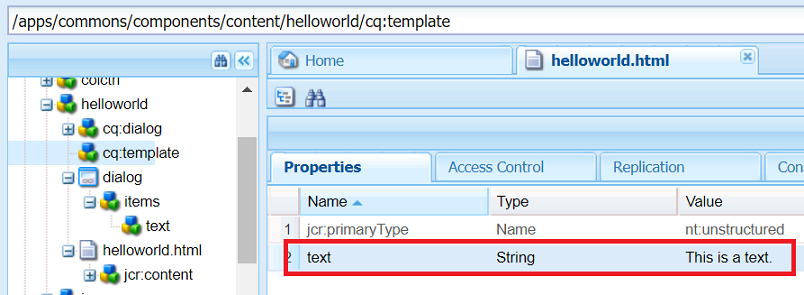
cq:template: This is a node having cq:template name of type nt:unstructured inside a
component. The use case for this property can be if you want to provide the default
values of properties of a component, then it can help you out.
cq:template node can have multiple properties and even other nodes as a children in case if you need to aggregate some of the properties (i.e., name = ./name/title).This content will be used as default values whenever you drop a new instance of the component from the sidekick.

Fig-Configure cq:template in a component
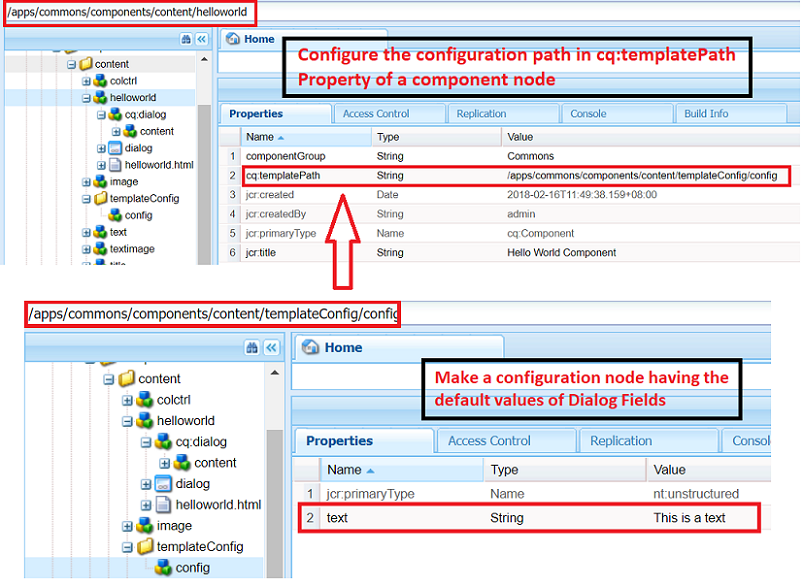
cq:templatePath: This property is of type string. If you want to share the same default values across multiple components, you can create a node with any name, put all the properties there and add the path of that node as a value in the cq:templatePath property.It works exactly like cq:template but with the help of cq:templatePath, the same values can be shared across multiple components.


Fig-Add configurationPath as the value of cq:templatePath property of the component

How these properties work?
When an author drops the component, the component fetches all the values from its templatePath or cq:template node and store them in the /content hierarchy of that component. When author opens the dialog, the values can be seen there. If the author wants to change, he/she can also do that.
Use Case: The use case of these properties can be if you have one style tab in a component where you decide font size, color, font-family ( something like theme), you can set the initial default theme of a component.

Demonstration Video on cq:template and cq:templatePath Properties of a Component:


If you have any query or suggestion then kindly comment or mail us at sgaem.blog02@gmail.com

Hope it will help you guys !!
Thanks and Happy Learning.

Saturday, January 6, 2018

Custom Sling Model Exporter in AEM 6.3

Hello Everyone,

You have already seen the magic of Sling Model Exporters in my previous blog.But there is something left with Sling Model Exporters which I would like to continue in this blog.

I have mentioned in the previous blog that we can have custom exporters in
Sling Model Exporters.
So let’s have some examples of creating custom exporters.Here I am going to demonstrate
GSON” and “JAXB” as two custom exporters in the concept of Sling Model Exporters.
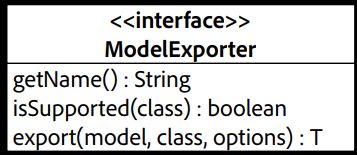
ModelExporter Interface
To create a custom exporter, we need to create a service that implements ModelExporter
with these three methods:
modelExporter.PNG
Fig - Model Exporter Interface

Here we will see two implementations of ModelExporter Interface:
  • ModelExporter Example: GSON
@Component(service = ModelExporter.class)
public class NewExporter implements ModelExporter {
  public <T> T export(Object model, Class<T> clazz,
                      Map<String, String> options)
          throws org.apache.sling.models.factory.ExportException {
      return (T) new Gson().toJson(model);
  }
  public String getName()
  {
      return "gson";
  }
  public boolean isSupported(Class Model1)
  {
      return true;
  }
}

And then this “gson” exporter can be used in the Sling Model like this.
@Model(adaptables = Resource.class, resourceType = {"weretail/components/structure/page"}, defaultInjectionStrategy = DefaultInjectionStrategy.OPTIONAL)
@Exporter(name = "gson", selector = "test",extensions = "json")
public class Model3 {
  @ValueMapValue(name = "jcr:title")
  private String title;
  public String getTitle()
  {
      return title;
  }
}

Fig - Response in JSON format using GSON Exporter
  • ModelExporter Example: JAXB
@Component(service = ModelExporter.class)
public class NewExporter implements ModelExporter {

  public <T> T export(Object model, Class<T> clazz,
                      Map<String, String> options)
          throws org.apache.sling.models.factory.ExportException {
          StringWriter sw = new StringWriter();
      try {
          JAXBContext jaxbContext =
                  JAXBContext.newInstance(model.getClass());
          Marshaller marshaller = jaxbContext.createMarshaller();
          marshaller.marshal(model, sw);
      } catch (JAXBException e) {
          e.printStackTrace();
      }
      return (T) sw.toString();
  }

  public String getName() {
      return "jaxb";
  }

  public boolean isSupported(Class Model1) {
      return true;
  }
}

And then this “jaxb” exporter can be used in the Sling Model like this.
@Model(adaptables = Resource.class, resourceType = {"weretail/components/structure/page"}, defaultInjectionStrategy = DefaultInjectionStrategy.OPTIONAL)
@Exporter(name = "jaxb", selector = "test",extensions = "xml")
@XmlRootElement
public class Model3 {
  @ValueMapValue(name = "jcr:title")
  private String title;
  @XmlElement
  public String getTitle()
  {
      return title;
  }
}


Fig - Response in XML format using JAXB Exporter

Let's have a demonstration video on Custom Sling Model Exporter:


Tips and Trick of Sling Model Exporters
  • Sling Model Exporters internally works on sling:resourceSuperType as well.If you have defined a resourceType in sling Model Exporter, it will check the resourceType of a request, if it doesn’t present it will go to its sling:resourceSuperType.

You can see the example here:
public class ResolveServletUsingPath extends SlingSafeMethodsServlet {
  @Reference
  private ModelFactory modelFactory;

  @Override
  protected void doGet(SlingHttpServletRequest request, SlingHttpServletResponse response) throws IOException {
      Resource resource = request.getResourceResolver().getResource("/content/we-retail/ca/en/experience/jcr:content");
      try {
         response.getWriter().print( modelFactory.exportModelForResource(resource,"jaxb",Model3.class,new HashMap<>()));
      } catch (ExportException e) {
          e.printStackTrace();
      } catch (MissingExporterException e) {
          e.printStackTrace();
      }
  }

Let's have a demonstration video on Tips and Tricks of Sling Model Exporters:

If you have any query or suggestion then kindly comment or mail us at sgaem.blog02@gmail.com

Hope it will help you guys !!
Thanks and Happy Learning.