Hi,
Run Modes is the most interesting feature in AEM. This allows you to tune your AEM instance for a specific purpose; for example author/publish, qa, development, intranet or others.
Why Run Modes?- Uniquely identify an environment and instances
- Unique configurations based on environment
- OSGI Component Creation for a specific environment
- Bundle Creation for a specific environment
- Primary Run Mode
- Secondary Run Mode
Primary Run Modes are:
- Author: This instance is used for the complete development and authoring purpose.
- Publish: This is the actual environment which can be accessed by end users.
- nosamplecontent: This instance is having no sample content(like geometrixx,we-retail not available).It is highly recommended in production environment because it is very secure and it provides no sample configurations.lt makes your instance production ready, by disabling CRXDE lite, webdav etc
- samplecontent: having sample content like geometrixx-all package.This is just for the help of developers,not required on any server.
Note: Primary Run Modes can’t be change once the aem jar is started.So at the time of AEM instance startup only, we need to finalize which primary run mode is required.
Combination of primary run modes also happen:
- Author+samplecontent
- Author+nosamplecontent
- Publish+samplecontent
- Publish+nosamplecontent
- Dev Server
- QA Server
- UAT Server
- Prod Server
We can create our own customized run modes on the basis of location( i.e., us,uk), language or any other basis.
Where we define Run mode?
- By Changing in sling:properties file
Steps to follow:
- Go to crx-quickstart/conf directory of aem instance and add the below line:
sling.run.modes= author,dev
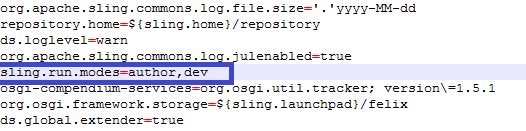 |
| Fig- Set the run mode in sling.properties file |
- Using the -r option: When you start the AEM instance by command prompt then set “-r” option in the command.
Example: java -jar jar-name -r dev,sameplecontent
- By Renaming Jar: cq5-<run-mode>-p<port-number>
Example: publish instance : cq5-publish -p4503.jar
Author instance : cq5-author-p4502.jar
Note: Only primary run modes (ex: author,publish) are applicable for renaming jar.
- By adding JVM arguments: When you start the AEM instance by command prompt then set the jvm parameter in the command. This will be something like this:
Java -jar JAR_NAME -Dsling.run.modes=publish,prod,us
- Go to Status tab in Navigation and click on sling settings option.
- Here you can see the Run Modes
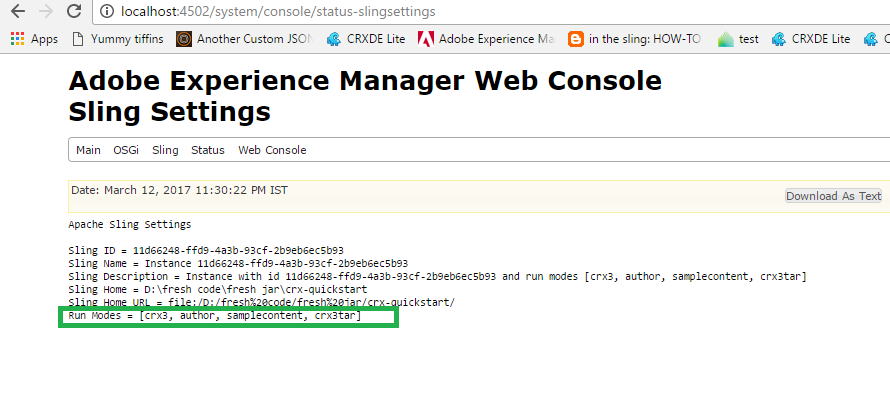 |
| Fig - Check the run mode of running AEM instance |
- You can directly go to http://localhost:4502/system/console/status-slingsettings
USE CASE OF RUN MODE IN THE PROJECT
In Felix Configurations, there is a configuration named as DAY CQ MAIL SERVICE. Now lets say we have a requirement of using smtp.port=25 in author, Dev,US server but smtp.port=465 in Author,QA,UK Server. (Here US and UK are the location of servers)
Solution:
Create Run Modes: - Go to /apps/my-project
Create Configurations for Author,Dev Server which is in US:
- Create a folder (sling:folder) with the name config.author.dev.us
- Create a sling:osgiConfig type of node named com.day.cq.mailer.DefaultMailService.config.
Note:Node name should be the same name as the Persistent Identity (PID) of the configuration in the OSGi Console.
- Add the following properties in this config for Dev Server:
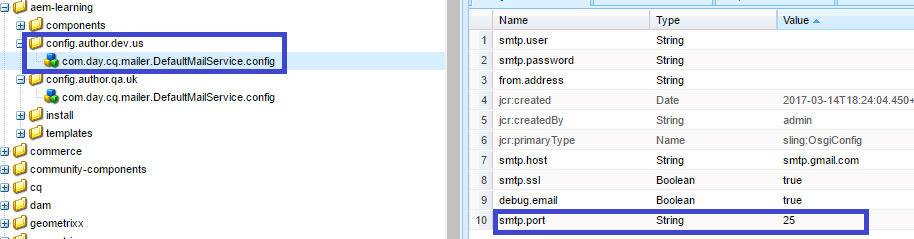 |
| Fig - Adding the mail service configuration for DEV,US run mode |
- Run an AEM instance on Author,Dev,US Environment by using any of the option explained above.
- Check the run mode of running AEM instance
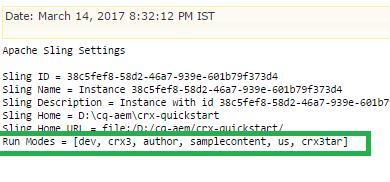 |
| Fig- AEM instance is in AUTHOR,DEV,US run mode |
- Now Check the mail Configurations
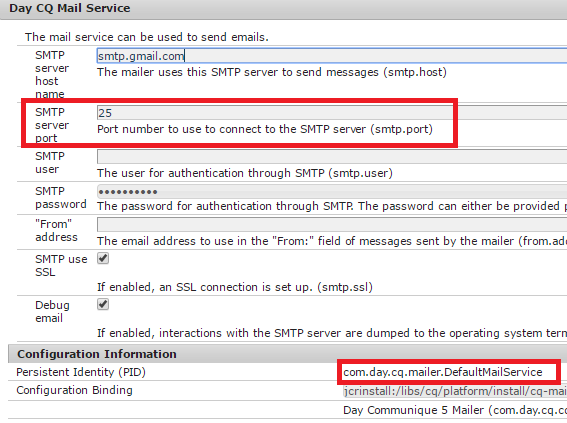 | |
|
Create Configurations for Author,QA Server which is in UK:
- Create a folder (sling:folder) with the name config.author.qa
- Create a sling:osgiConfig type of node named com.day.cq.mailer.DefaultMailService.config
- Add the following properties in this config for QA Server:
 |
| Fig - Adding the mail service configuration for QA,UK run mode |
- Run an AEM instance on Author, QA,UK Environment by using any of the option explained above.
- Check the run mode of running AEM instance
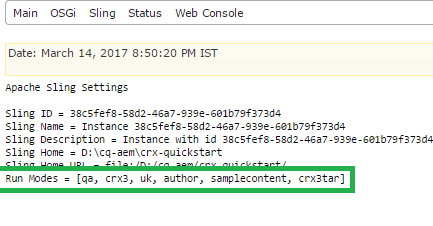 |
| Fig- AEM instance is in AUTHOR,QA,UK run mode |
- Now Check the mail Configurations in Felix Console
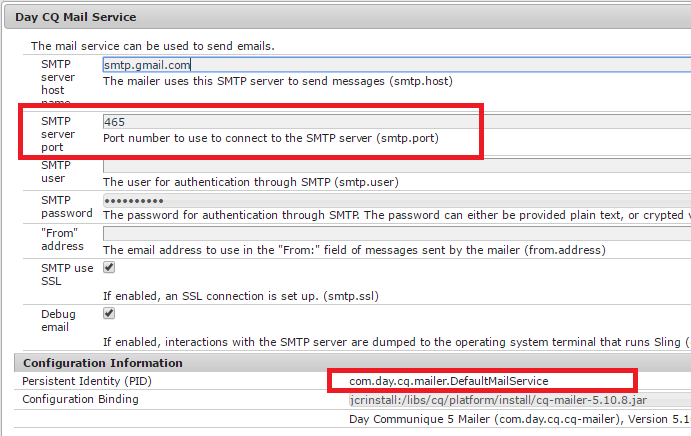 |
| Fig- Check the configuration in felix console for QA,UK run mode aem instance |
The minimum possible configurations for AEM environments.
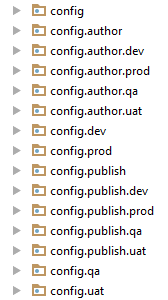 |
| Fig- Minimal possible configuration in any AEM project |
Note: Every run mode tries to find out the best possible match available for configuration.
If multiple configurations for the same PID are applicable, the configuration with the highest number of matching run modes is applied.
Let's discuss other two use cases in Run Modes - Part2 .
Let's discuss other two use cases in Run Modes - Part2 .
If you have any query or suggestion then kindly comment or mail us at sgaem.blog02@gmail.com.
Thanks and Happy Learning 😊