Hello Everyone,
Clientlibs is one of my favorite concepts of AEM and frequently asked in interviews.There is a lot of information available on internet regarding same. Lets discuss some of the concept related to clientlibs in this blog...
Below are the questions which hits your mind when you think about clientlibs:
- What are Client-Side Libraries?
- Why Client-Side Libraries?
- Feature or Properties of Clientlibs
- Tips and Tricks over the concept of Clientlibs
Let's explore the answers for all above ...
What are Client-Side Libraries?
➤ Modern websites rely heavily on client-side processing driven by complex JavaScript and CSS code. Organizing and optimizing the serving of this code can be a complicated issue.
➤ To deal with this issue, AEM provides the concept of Client-Side Library Folder which allows you to store client side code in the repository, organize it into categories and decide when and how each category code is served to the client.
➤ Client side libraries play a very crucial role to provide rich functionality to end user. Clientlibs is used to manage these libraries in AEM.
Why Client-Side Libraries?
Client-Side Libraries include JS and CSS files. Below is the traditional way of using these on any web page:
<head>
<link rel="stylesheet"href="/etc/clientlibs/aem-developer/css/test.css">
<script type="text/javascript"src="/etc/clientlibs/aem-developer/js/test1.js"></script>
<script type="text/javascript" src="/etc/clientlibs/aem-developer/js/test.js"></script>
</head>
|
In the above code, there will be separate network call for each js and css file.
But think, if hundreds of CSS and JS files present in website, then each file will have a network call due to which overall performance will be reduced as load time of a web page will increase gradually.
⟹ No. of Request ∝ Page load Time
|
So AEM came up with a better approach. Only two calls will be there for single clientlibs, one for js and another for CSS.
Irrespective of number of CSS file present, only single CSS call will be there and all css file will be embedded in same call and same applicable for JS file as well.
How to Create Client-Side Library Folder
Steps to follow:
How to Create Client-Side Library Folder
Steps to follow:
1.Go to any folder where you want to locate a client library Folder.Create a Node here of type cq:clientLibraryFolder.
2.To specify the categories ,add the property in the clientLibraryFolder like this:
- Name : categories
- Type : String[]
- Value : category_name
3.Add source files(css and js files) to the categories.You can organise these files in subfolders as well.
4.Select the clientLibraryFolder, and create the following files:
- js.txt: Use this file to generate java script file.
- css.txt: Use this file to generate css file.
#base=[root]
|
Replace [root] with the path of the folder that contains the source files,relative to the txt files.
If all the source files are in the same folders of the txt files.Use this
#base=.
|
If all the source files are under a specific folder i.e. mobile
#base=mobile
|
How AEM manage the ClientLibs?
There are two ways to include client-side libraries in your page but it depends on what we are using (JSP or HTL), But nowadays HTL is very popular in AEM.
In HTL (Sightly):
<sly data-sly-use.clientLib="${'/libs/granite/sightly/templates/clientlib.html'}"/>
<sly data-sly-call="${clientLib.all @ categories='apps.aem-learning'}"/>
|
Note: In HTL,client libraries are loaded through a helper template(/libs/granite/sightly/templates/clientlib.html) provided by AEM.
This helper template expects a categories option for referencing the desired client libraries.That option can be either an array of string values, or a string containing a comma separated values list.
Note: Here keyword “all” stands for all the JS and CSS files.If you want to call js and CSS specifically, replace all keyword with “CSS” or “JS”.
In JSP:
|
<ui:includeClientLib categories="<%= categories %>" />
|
Use below if you want to use CSS specifically,
<ui:includeClientLib css="apps.aem-learning"/>
|
Use below if you want to use JS specifically,
<ui:includeClientLib js="apps.aem-learning"/>
|
The generated HTML page contains the following code:
<link rel="stylesheet" href=”/etc/clientlibs/aem-developer.css" type="text/css"></link>
<script type="text/javascript" src="/etc/clientlibs/aem-developer.js"></script>
|
Note: <cq:includeClientLib> which in the past was commonly used to include client libraries, has been deprecated since AEM 5.6.<ui:includeClientLib> should be used instead as detailed above.
Feature or Properties of ClientLibs
- Categories: This property uniquely identifies the Clientlibs and a Clientlibs can be included in a page using categories.The categories property being multi-valued,allows a library folder to be the part of more than one category.
Note: It is advisable to preface the category value by ‘apps’ or ‘etc’ to specify the location of Clientlibs.
- Dependencies: There is a list of other client-side libraries on which the library folder depends.
To identify dependencies, add a property to your cq:ClientLibraryFolder node with the following attributes:
 |
| Fig - dependencies property in clientlib folder |
- Name: dependencies
- Type: String[]
- Values: The value of the categories property of the cq:ClientLibraryFolder node that the current library folder depends on.
<link rel="stylesheet" href=”/etc/clientlibs/sgaem/B.css" type="text/css">
<script type="text/javascript" src="/etc/clientlibs/sgaem/B.js"></script>
<link rel="stylesheet" href=”/etc/clientlibs/sgaem/A.css" type="text/css">
<script type="text/javascript" src="/etc/clientlibs/sgaem/A.js"></script>
|
Note: Dependencies property is transitive – if Clientlib A depends on B and B depends on C, then all clientlibs will be included in the page in the order of C>B>A.
- Embed: It is used to embed code from other libraries. Use the categories property to identify the client library folder to embed. To embed the library, add a property to the embedding cq:ClientLibraryFolder node, using the following property attributes:
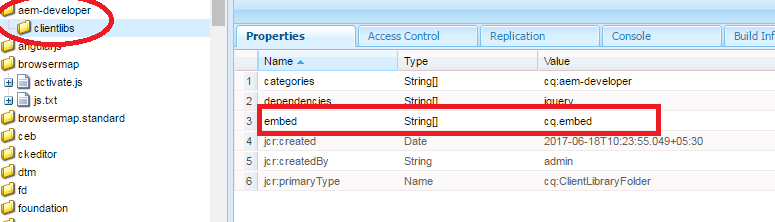 |
| Fig- embed property in clientlib folder |
- Name: embed
- Type: String[]
- Value: The value of the categories property of the cq:ClientLibraryFolder node that the current library folder embed upon.
Note: Name of final JS or CSS file will be same as the parent client-library. Here A is the parent client-library folder.
<link rel="stylesheet" href=”/etc/clientlibs/sgaem/A.css" type="text/css">
<script type="text/javascript" src="/etc/clientlibs/sgaem/A.js"></script> |
This property reduces a large number of network calls for clientlibs.
Note: Embed property is NOT transitive – If Clientlib A embed B and B embed C, then only A and B will be included in the page,but C won't. In order to include Clientlib C, it must be added to the embed property of A as well.
Tips and Tricks over the concept of clientlibs
Let's troubleshoot What happens when:
➤ Clientlibs A is dependent on B,B is dependent on C
 |
| Fig- Example of nested dependencies property |
CSS Calls:
<link rel="stylesheet" href=”/etc/clientlibs/aem-developer/C.css" type="text/css">
<link rel="stylesheet" href=”/etc/clientlibs/aem-developer/B.css" type="text/css">
<link rel="stylesheet" href=”/etc/clientlibs/aem-developer/A.css" type="text/css">
|
JS Calls:
<script type="text/javascript" src="/etc/clientlibs/aem-developer/C.js"></script>
<script type="text/javascript" src="/etc/clientlibs/aem-developer/B.js"></script>
<script type="text/javascript" src="/etc/clientlibs/aem-developer/A.js"></script>
|
A category tries to solve its dependency and B also does the same,that’s why C is being called very first and after that B and A.
➤ Clientlibs A is embed on B,B is embed on C.
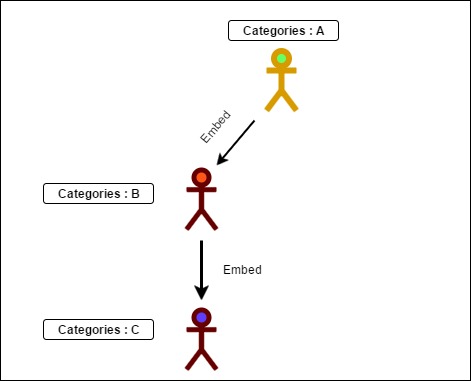 |
| Fig- Example of nested embed property |
Embed doesn’t provide transitive addition that’s why only A and B is being called.B is embedded in A calls.
<link rel="stylesheet" href=”/etc/clientlibs/aem-developer/A.css" type="text/css">
<script type="text/javascript" src="/etc/clientlibs/aem-developer/A.js"></script>
|
➤ Clientlibs A is dependent on B,B is dependent on C and C is dependent on A
Note:No clientlibs is getting called as it becomes the condition of infinite loop
Note:No clientlibs is getting called as it becomes the condition of infinite loop
➤ Clientlibs A is embed on B,B is embed on A.
Note: It will work same as scenario:2 as B doesn’t consider its embed to be resolved because embed doesn’t have transitive addition.
➤ Clientlibs A is embed on B and dependent on C.
 |
| Fig- Example of embed with dependencies property |
If a clientlibs will have both dependency and embed,then it’s priority will be to resolve dependency at first and then embed.
NO. of CSS calls:
<link rel="stylesheet" href=”/etc/clientlibs/aem-developer/C.css" type="text/css">
<link rel="stylesheet" href=”/etc/clientlibs/aem-developer/A.css" type="text/css">
|
NO. of JS Calls:
<script type="text/javascript" src="/etc/clientlibs/aem-developer/C.js"></script>
<script type="text/javascript" src="/etc/clientlibs/aem-developer/A.js"></script>
|
After all this interesting stuff,clientlibs is not over yet.So stay tune and wait for our next blog.
If you have any query or suggestion then kindly comment or mail us at sgaem.blog02@gmail.com
Hope it will help you guys !!
Thanks and Happy Learning .😊
Thanks and Happy Learning .😊