Ad Code

Thursday, December 6, 2018

"note" resourceType in AEM Dialogs

Hello Everyone,

Today In this quick blog I am writing about “note” resourceType in a dialog that can be a life
saver. I was amazed why i haven’t know about it and used  it before.

Problem Statement:In AEM, we always try to make dialogs user friendly as much as we can and sometimes we give instructions to authors by giving fieldDescription corresponding to every field. But the problem with fieldDescription is author always need to hover on tooltip to read the instruction.

I was always looking for something better so that author can directly open the dialog
and can see what he/she supposed to enter in the fields.

So Here, a note resourceType came for rescue.This resourceType is available
here: /libs/cq/gui/components/authoring/dialog/note

How to use this:

Make a node with these below properties:
jcr:primaryType : nt:unstructured
sling:resourceType:cq/gui/components/authoring/dialog/note
note: “Any note for Authors”
That's all you need to do.
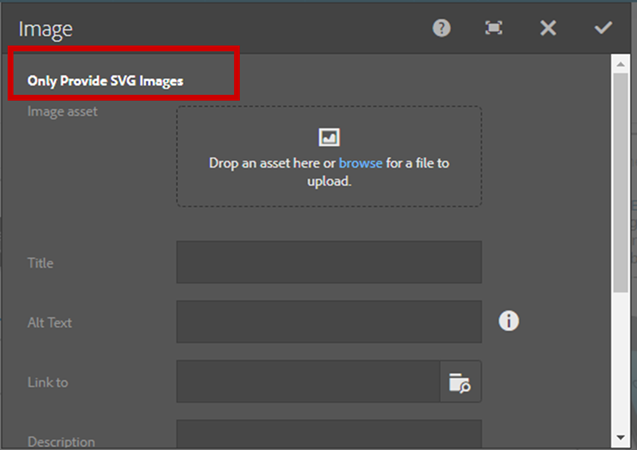
Dialog After Adding note resourceType

Extended Problem Solving: But i was trying to make an additional thing with this note.I want to provide a hyperlink in the dialog also.So this is also very easy to do. You can overlay or override this note resourceType and change the note.jsp line number 32 .

<h4 class="coral-Heading coral-Heading--4"><%=outVar(xssAPI, i18n, note) %></h4>
to
<h4 class="coral-Heading coral-Heading--4"><%=note %></h4>

After that you can add hyperlinks also in the dialogs by writing html also.
Demonstartion Video on "note" resourceType in AEM Dialogs:

If you have any query or suggestion then kindly comment or mail us at sgaem.blog02@gmail.com

Hope it will help you guys !!
Thanks and Happy Learning.
Friday, September 21, 2018

Deep Dive in Sightly/HTL in AEM Part-2

In my previous blog, you have already gone through a lot of HTL/Sightly syntax
and usage of them in AEM.

But the magic of sightly is not over yet. In this blog we will take a look over tips and tricks of
HTL with some project related use cases, because sometimes we know the concept
but we don't know where to use it.

1. Component Placeholder: When we create a component, it’s good to have a placeholder for that component in edit mode.You can add this syntax for placeholder:
<sly data-sly-test="${wcmmode.edit}">
  <div class="cq-placeholder cq-marker-start" data-emptytext="Title"></div>
</sly>

2. data-sly-attribute: This block statement sets an attribute to an element. The attribute will be shown only if the value exists unless the attribute is omitted..
Use Case: Required- Let suppose we have one checkbox in my textfield component, and if author checks it add required attribute like this else not.
<input type="text" name="usrname" required>
So to achieve this, we can do like this:
<input type="text" name="username" data-sly-attribute.required="${properties.required=='true'}"/>

3.Avoid using HTML Comments: because they become the part of final markup. So to make the dom clean, always use HTL Comments.
Avoid HTML Comments: <!-- This is HTL Comment -->
Use HTL Comments <!--/* This is HTL Comment */-->

4.Context-Sensitive:
a. styleString:There are many components where we need to provide inline css for functionality like background-image etc.So how to achieve that
<div style="background-image:url('${properties.bgImage @context='styleString'}');">
</div>

b. scriptString:There are many cases when we need to pass dynamic values to jquery to perform some operations like to pass a value to ajax for query parameter.
<script>
       var teaserConfig = {
           skin: "${teaser.skin @ context='scriptString'}",
           animationSpeed: ${teaser.animationSpeed @ context='number'}
       };
   </script>

You can fetch this variable in js file using window.teaserConfig.skin.
Problem: But in the above scenario, we need to use inline css and JS, which is been discouraged to keep a clean separation of concern. So is there is any better way to do so?
Solution: I think yes “data-attribute”. Through data attributes, we can’t cover all the possible scenarios of inline css and js but can try to manage it at some extent.

How to avoid inline JS: Inline js can be completely avoid using data-attributes
<div class=”test” data-path=”${properties.path}”></div>
In JS, you can fetch the value of data attribute :
var test = $(.test).data(“path”);

Through this inline js can be avoided.

How to avoid inline CSS: We need to use inline css in several components like for dynamic background-image, height and width of an image or many situations can be there.We can’t avoid inline css for these scenarios but we can use classes and write css for them if we have fixed number of options.

5.Always use existing HTML elements for block statements.
<div class="cq-placeholder cq-marker-start" data-emptytext="Title” data-sly-test="${wcmmode.edit}"></div>

6. Ternary Operator:There are so many use cases when we need to use ternary operator.In Ternary operator the syntax is very important:
${properties.pageTitle ? properties.jcr:title : resource.name}

7.Condition based on Page Template: Assume, a particular section of code only should be executed if the template of the page is /apps/geometrixx/templates/homepage.

If you write code like this:
${currentPage.template.path == ‘/apps/geometrixx/templates/homepage’}

This doesn’t work in publish environment. So to solve this problem, you can use
${pageProperties.cq:template == ‘/apps/geometrixx/templates/homepage’}

If there is really a need to use currentPage.template.path, you will need to provide read rights
to anonymous user on your template path.

You can provide read rights from OSGI Console using config option available for
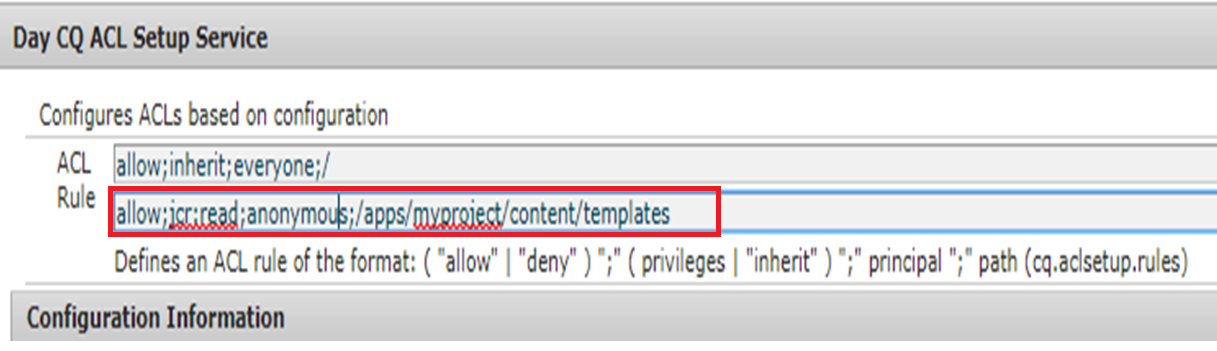
Day CQ ACL Setup Service (com.day.cq.security.ACLSetup), put the entry like
allow;jcr:read;anonymous;/apps/<project_identifier>/templates, After that you can cross check from permissions console tab if it took new permissions for anonymous user.
You can also directly go and configure permissions for using the permissions tab also.

Configuring via OSGI Config is better approach as you can push those configure using
config XML's:


Fig 1- Day CQ ACL Setup Service

Demonstartion Video on Deep Dive in Sightly/HTL in AEM Part-2 :


If you have any query or suggestion then kindly comment or mail us at sgaem.blog02@gmail.com

Hope it will help you guys !!
Thanks and Happy Learning.
Sunday, March 4, 2018

Deep Dive in HTL/Sightly in AEM 6.3

Hello Everyone,

The term “sightly” or “HTL” is not very new to all of us. We have been developing our components in HTL in place of “JSP” since long.

But as it is little hard to remember all the syntax, In this blog I am trying to cover all the possible block statements in HTL/sightly with use cases as well.

How to include parsys in HTL/Sightly

<div data-sly-resource="${'parsys' @resourceType = 'wcm/foundation/components/parsys'}"></div>

While included parsys in the Page Component, you need to add init.jsp in the page.
<sly data-sly-include="/libs/wcm/core/components/init/init.jsp"/>

Note: Don’t add init.jsp on every page or component, where you need parsys to include. Just add it in base page component and use it everywhere.

How to include clientlibs in a page OR a component in HTL/Sightly

While using single clientlibs:
<sly data-sly-use.clientlib="/libs/granite/sightly/templates/clientlib.html"
data-sly-call="${clientLib.all @ categories='apps.aem-learning'}"/>

While using multiple clientlibs:
<sly data-sly-use.clientlib="/libs/granite/sightly/templates/clientlib.html"
data-sly-call="${clientlib.all @ categories=['myCategory1', 'myCategory2']}"/>

Note: Here keyword “all” stands for all the JS and CSS files. If you want to call JS and CSS specifically, replace all keyword with “CSS” or “JS”.

Difference between data-sly-list and data-sly-repeat
The difference between data-sly-list and data-sly-repeat is that list just iterates the items written inside its condition.
Example:
<ul data-sly-list="${ currentPage.listChildren }">
   <li>  ${item.name} </li>
</ul>

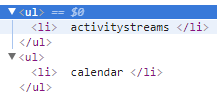
The DOM structure of the list statement will be:
Fig 1: DOM Structure of data-sly-list statement
But if you put the same statement with data-sly-repeat, it will iterate the complete structure including the conditional statement as well.
Example:

<ul data-sly-repeat="${ currentPage.listChildren }">
   <li>  ${item.name} </li>
</ul>

The DOM structure of the above statement will be:
Fig 2: DOM Structure of data-sly-repeat statement
If you want to have the same output from repeat, like list, you need to write something like:

<ul>
      <li data-sly-repeat.child="${ currentPage.listChildren }">
  ${child.name}
      </li>
</ul>

An additional itemList (respectively <variable>List in case a custom identifier/variable was defined using data-sly-list.<variable>) identifier is also available within the scope, with the following members:

  • index: zero-based counter (0..length-1)
  • count: one-based counter (1..length).
  • first: true for the first element being iterated.
  • middle: true if element being iterated is neither the first nor the last.
  • last: true for the last element being iterated.
  • odd: true if index is odd.
  • even: true if index is even

In case of default identifier:
<ul data-sly-list="${currentPage.listChildren}">
   <li data-sly-test="${ itemList.even}">${item.title}</li>
</ul>
In case of custom identifier:
<ul data-sly-list.child="${currentPage.listChildren}">
       <li data-sly-test="${childList.even}">${child.title}</li>
</ul>
In AEM 6.4,HTL introduces some attributes for list and repeat that allows to control the iteration through the following options.
  • begin: iteration begins at the item located at the specified index; first item of the collection has index 0
  • step: iteration will only process every step items of the collection, starting with the first one
  • end: iteration ends at the item located at the specified index (inclusive)
<ul data-sly-list.child="${currentPage.listChildren @ begin = 0, step = 5 ,end = 9}">
   <li>${child.title}</li>
</ul>

How to iterate map objects in HTL/sightly

<sly data-sly-use.model="com.aem.project.core.models.HelloWorldModel"/>
<p data-sly-test.myMap="${model.map}" data-sly-repeat.mapItem="${myMap}">
   <span>key: ${ mapItem }</span>
<span>value: ${myMap[mapItem]}</span>
</p>

Note:Always use the identifier instead of default “item” variable for list of block and repeat statements.

How to use data-sly-use in HTL/Sightly

Initializes a helper object (defined in JavaScript or Java) and exposes it through a variable.
The identifier set by the data-sly-use block element is global to the script and can
be used anywhere after its declaration:
<sly data-sly-use.model="com.aem.project.core.models.HelloWorldModel"/>
       ${model.path}
data-sly-use with input parameters:

<div data-sly-use.model="${'com.aem.project.core.models.HelloWorldModel'
@ pageTitle=currentPage.title , pageNae = currentPage.name}">
${model.pageTitle}
${model.name}

Note: Try to place use data-sly-use statements only on top-level elements.

How to use data-sly-test in HTL/Sightly

  • data-sly-test behaves like an if condition in HTL.It removes the whole element from the markup if the expression evaluates to false.
<meta data-sly-test.keywords="${properties.keywords}" name="keywords" content="${keywords}"/>
<p data-sly-test="${wcmmode.edit}">You are in edit mode</p>

Note that the identifier contains the value of the condition as it was (not casting it to a Boolean value):
  • Always cache test block statement results in an identifier if it repeats itself. There may be a need of using a value at various place in a single HTML, so it’s good to have a variable having that value and use it at all places.

<sly data-sly-test.path="${currentPage.path}"/>
Now ${path} can be used to show the path of currentPage.

What is the use of sly tag?
sly tag don’t let be the statements the part of DOM and clears out the rendered HTML and get rid of additional divs. You can also use data-sly-unwrap to remove the element from DOM.

Note: Always use existing HTML elements for your block statements if possible.

Demonstration Video On


How to use data-sly-element in HTL/Sightly

Replaces the element's tag name:
The element name is automatically XSS-protected with the elementName context, which by the way doesn't allow elements like <script>, <style>, <form>, or <input>.
<h1 data-sly-element="${properties.elementName}">This is element example </h1>

It will replace the h1 tag with the value of elementName.

Note: context='elementName' allows only the following element names:
section, nav, article, aside, h1, h2, h3, h4, h5, h6, header, footer, address, main, p, pre, blockquote, ol, li, dl, dt, dd, figure, figcaption, div, a, em, strong, small, s, cite, q, dfn, abbr, data, time, code, var, samp, kbd, sub, sup, i, b, u, mark, ruby, rt, rp, bdi, bdo, span, br, wbr, ins, del, table, caption, colgroup, col, tbody, thead, tfoot, tr, td, th

data-sly-resource in HTL/Sightly
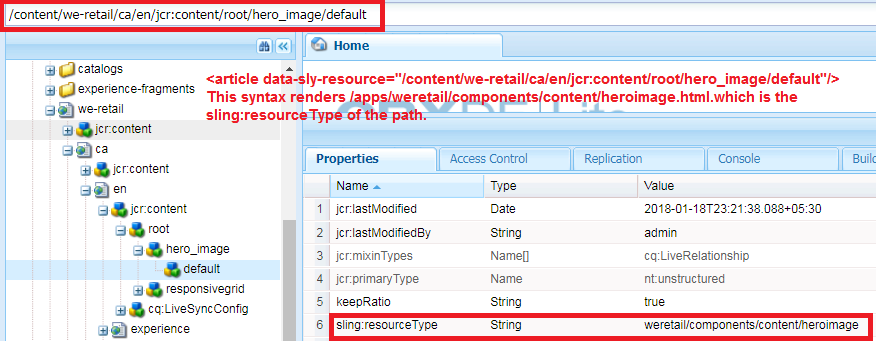
Includes the result of rendering the indicated resource through the sling resolution and rendering process. It works completely on the concept of sling resolution.

Manipulating the path of the resource.
<article data-sly-resource="${@path='path/to/resource'}"/>

Examples:
<article data-sly-resource="${@path='/content/we-retail/language-masters/en
/equipment/jcr:content/root/hero_image'}"/>

<article data-sly-resource="${@path='/content/we-retail/language-masters/en
/equipment/jcr:content/root',appendPath='hero_image'}"/>

<article data-sly-resource="${@path='hero_image',prependPath='/content/
we-retail/language-masters/en/equipment/jcr:content/root'}"/>

Replace the selector from the existing ones.
<article data-sly-resource="${'path/to/resource' @selectors='selector'}"></article>
<article data-sly-resource="${'path/to/resource' @selectors=[''selector1',''selector2']}">
</article>

Examples:
<article data-sly-resource="${'/content/we-retail/language-masters/en
/equipment/jcr:content/root/hero_image' @selectors='s1'}"></article>

<article data-sly-resource="${'/content/we-retail/language-masters/en
/equipment/jcr:content/root/hero_image' @selectors=['s1','s2']}"></article>

Add a selector to the existing ones.
<article data-sly-resource="${''path/to/resource' @addSelectors='selector'}"></article>

Examples:
<article data-sly-resource="${'/content/we-retail/language-masters/en/equipment/jcr:content/root/hero_image' @addSelectors='s1'}"></article>

Remove the selectors from the existing ones.
<article data-sly-resource="${'path/to/resource' @removeSelectors='s1'}"></article>

Examples:
<article data-sly-resource="${'/content/we-retail/language-masters/en/equipment/jcr:content/root/hero_image' @removeSelectors='s1'}"></article>

Remove all selectors.
<article data-sly-resource="${'path/to/resource' @removeSelectors}"></article>

Overrides the resourceType of a resource.
<article data-sly-resource="${'path/to/resource' @resourceType = 'my/resource/type'}">
<article>

Changes the WCMMode
<article data-sly-resource="${'path/to/resource' @wcmmode='disabled'}"></article>

By default, The AEM Decoration Tags are disabled, the decoration tagName option
allows to bring them back and the cssClassName to add classes to that element.
<article data-sly-resource="${'path/to/resource' @ decorationTagName='span',
cssClassName='className'}"></article>

Difference between selectors and addSelectors Attribute with an example
selectors: selectors attribute is used to replace the selector.
<article data-sly-resource="${'/content/we-retail/ca/en/jcr:content/root/hero_image/default.s1.html' @ selectors='s2'}"></article>
It renders s2.html

addSelectors: is used to add the selector.
<article data-sly-resource="${'/content/we-retail/ca/en/jcr:content/root/hero_image/default.s1.html' @ selectors='s2'}"></article>
It renders s1.s2.html script.

Demonstration Video on data-sly-resource:


Note: In the above blog, I am calling one sling model named HelloWorldModel.java, which can be seen on github.
If you have any query or suggestion then kindly comment or mail us at sgaem.blog02@gmail.com

Hope it will help you guys !!
Thanks and Happy Learning.